I built Nullstep as a personal product and marketing project: a working application, a search-focused website, and launch content for Instagram. I owned the product, page structure, copy, and social creative.
I wanted a real proving ground for my skills: ship a live product and a credible marketing layer, not a mockup. Nullstep needed a calm in-app experience and pages findable through search, AI answers, social channels, and paid social.
Approach
I engineered the product loop first, then layered marketing: keyword research, page titles and internal links, conversion copy, clear product descriptions and FAQs, social posts, and Meta ad angles aligned to landing pages.
Outcome
A marketing website and published content, supported by GA4 and Search Console snapshots. Measured observations and tracking limitations are documented below.
Marketing decisions
Three decisions behind the launch
01 / Search intent
I organized pages around features, use cases, questions, and pricing to address different stages of product discovery.
02 / Path to signup
I connected the product promise to interface examples and calls to action. The detailed captures below show the page structure on desktop and mobile.
03 / Consistent launch creative
I carried the landing-page messaging into scripts, reels, and Instagram posts. The collection below shows the published creative.
This case study documents delivery and my decisions. It does not yet establish a measured increase in traffic or conversions. The next evaluation step is to connect search and Instagram visits to signups over a defined reporting period.
Measurement & analysis
Nullstep, by the numbers
Snapshots from my GA4 and Google Search Console dashboards, captured October 5, 2026. Organic search and overall site activity are shown separately, with their respective reporting periods.
Audience findings
Google Analytics 4
Website visitors & engagement
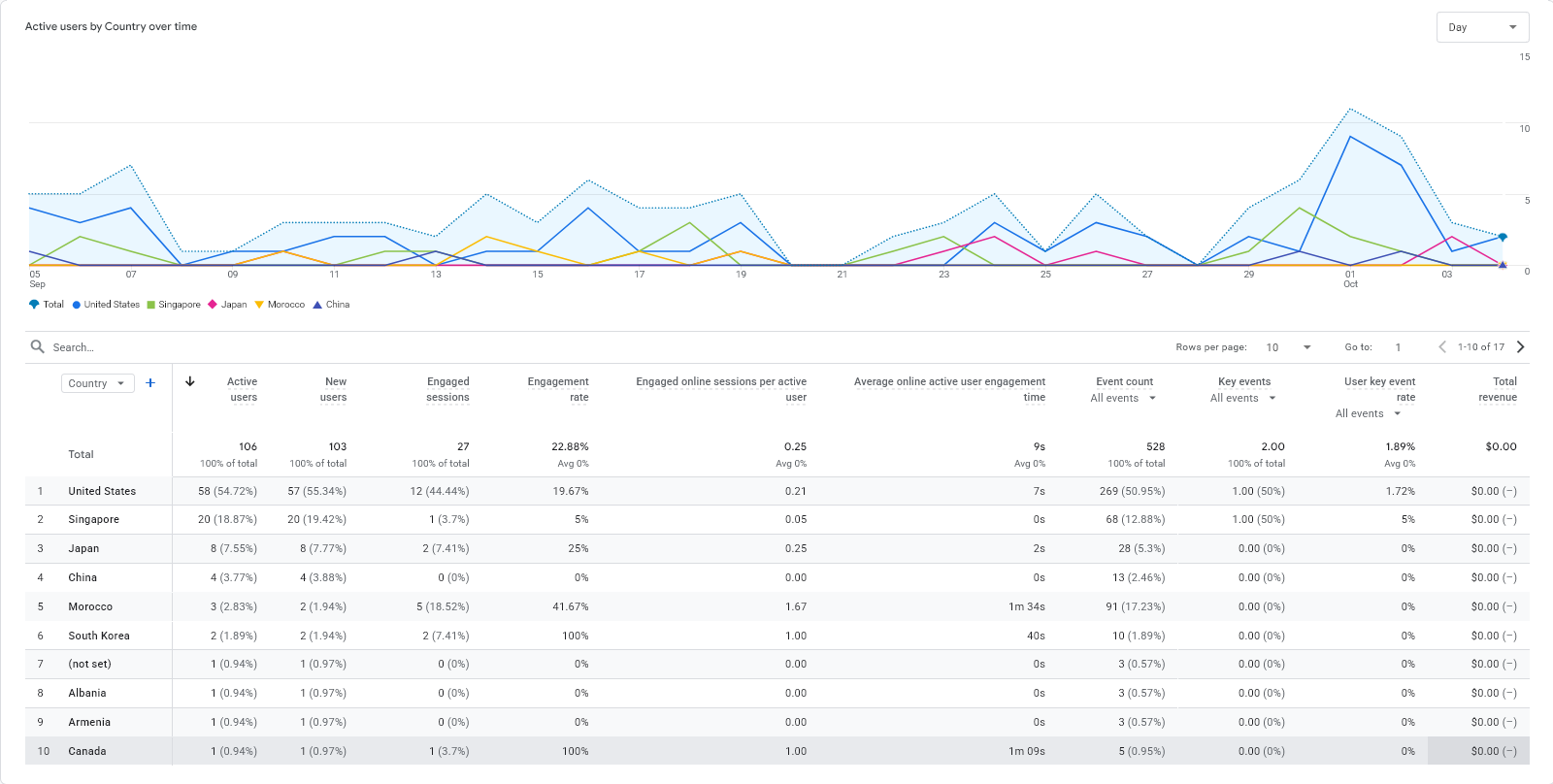
An international audience, with different levels of engagement across countries. Visible chart: September 5–early October 2026; exact date filter not shown.
Active users
106
Engaged sessions
27
Engagement rate
22.88%
Average engagement time
9s
Leading countries · active users
United States58 · 54.72%
Singapore20 · 18.87%
Japan8 · 7.55%
China4 · 3.77%
Morocco3 · 2.83%
01 / Reach
The United States accounts for nearly 55% of active users, followed by Singapore (19%). International reach is visible, but US average engagement remains at 7 seconds.
02 / Visit quality
The 3 Moroccan users generated 5 engaged sessions, with an average engagement time of 1m 34s. An interesting signal, from a sample too small to generalize.
03 / Next investigation
The overall 22.88% engagement rate warrants a closer look at traffic sources and landing pages. Page and path reports are needed to identify which content visitors viewed and where they exited.
This country breakdown covers a different period from the January–October overview below. The figures are not combined.
Google Search Console
Google search visibility
Chart: May–October 2026 · exact date filter not shown
Clicks
38
Impressions
818
Average CTR
4.6%
Average position
14.7
Original screenshot supplied by the project creatorView full size
818 impressions and 38 clicks show initial organic visibility. This snapshot provides a baseline for tracking queries, pages, and their performance over time.
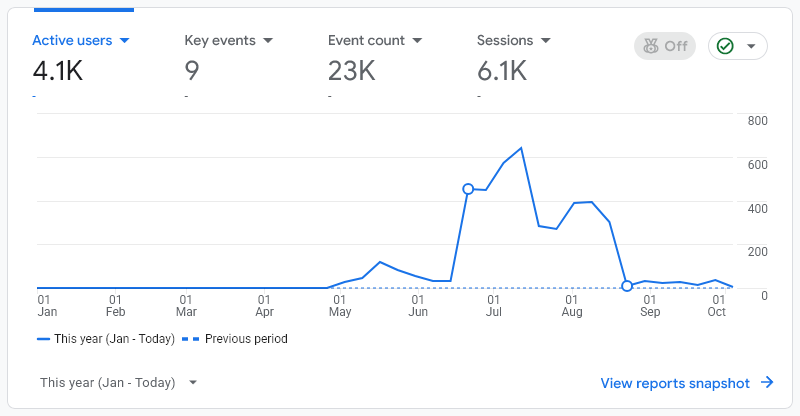
Google Analytics 4
Site audience and activity · all channels
This year: January–October 5, 2026
Active users
4.1K
Sessions
6.1K
Events
23K
Key events
9
Original screenshot supplied by the project creatorView full size
Activity is concentrated between June and August. This overall view does not attribute visits to SEO or establish that the 9 key events were sales or signups.
Values are reproduced as displayed, including GA4 rounding. These snapshots alone do not demonstrate an SEO-driven increase; the next step is to compare equivalent periods and connect traffic sources to signups.
Method, measurement and next steps
Project scope
Personal project, separate from employment or a client engagement. Documented build period: February–July 2026; analytics captured October 5, 2026. Current maintenance status remains to be confirmed.
Events ≠ registrations
The GA4 screenshot shows 9 key events. Event names, trigger rules and counting settings were not supplied, so their precise meaning is unverified. No verified registration total or channel attribution is available in this case study.
Analysis example · proposed test
Finding
The country report shows 22.88% engagement and 9 seconds average engagement. The visible period is September–early October, separate from the yearly overview.
Proposed test
Segment by source/medium and landing page; audit tracking, then test clearer messaging and one primary call to action on a selected page.
Planned measurement
Compare equivalent periods with consistent filters: engaged sessions, CTA clicks and verified registrations. No outcome from this test has been measured yet.
Keyword-to-page map · proposed plan
An editorial plan based on the documented pages. These queries are targeting hypotheses, not a Search Console export or achieved rankings.
Target query
Intent
Page
Page rationale
Nullstep
Navigational · branded
Home
Introduce the product and link to its features.
AI task planning tool
Discovery · non-branded
Features
Explain capabilities with interface examples.
how to plan tasks with AI
Informational · non-branded
How it works
Explain the product workflow step by step.
Nullstep pricing
Comparison · branded
Pricing
Make the offers and their differences easy to compare.
Branded/non-branded traffic shares, page-level clicks and exit pages are not available in the supplied screenshots. Search Console Queries/Pages and GA4 Acquisition/Landing pages exports are needed to analyse them.
Traffic quality and limitations
Country distribution is an observation, not evidence of successful targeting. Traffic sources, landing pages, internal visits, bot exclusions and consent effects are not documented here. Engagement differences therefore do not establish their cause.
Advertising experience
The CV describes Google Ads/Meta Ads setup and iterations. Creative concepts and content are visible in the portfolio. No verified delivery report with objective, dates, budget and results has been supplied for a campaign run, so no paid-campaign performance is claimed here.
Social & video
Nullstep: from product to Instagram
From the first line to the final edit. A selection of my creative work for Nullstep.
My contribution: product messaging, scripts, visual design, video editing, and publication.
Explore the pages and product walkthrough
Inside the app
Dashboard, Zen Chat, and Kanban: one execution loop
The marketing site sells the promise. The product delivers it: open the dashboard, talk through your goal in Zen Center, review the Execution Path, and watch tasks land on the board ready to ship.
01
Command dashboard
The home surface after login. Shows today's priority, active execution path, and recent Zen sessions so founders always know what to do next. No blank canvas, no tab hunting.
02
Zen Center · AI chat
A distraction-free chat workspace. Describe a goal in plain language, plan your day, or ask for the next step. Every conversation is saved so context carries into the next session.
03
Kanban execution board
To-Do, In Progress, and Done columns populate automatically from Zen Chat and the Execution Path. Drag, drop, and mark complete without re-entering work born in conversation.
04
Execution Path
The bridge between chat and board. AI returns a prioritized list grouped by Today, Next, and Later. Edit manually or ask why something ranked where it did before tasks sync to Kanban.
Full site walkthrough
Five pages, one execution story
Each page has one job. Screenshots fill the card so you can scan the whole site without dead space on the sides.
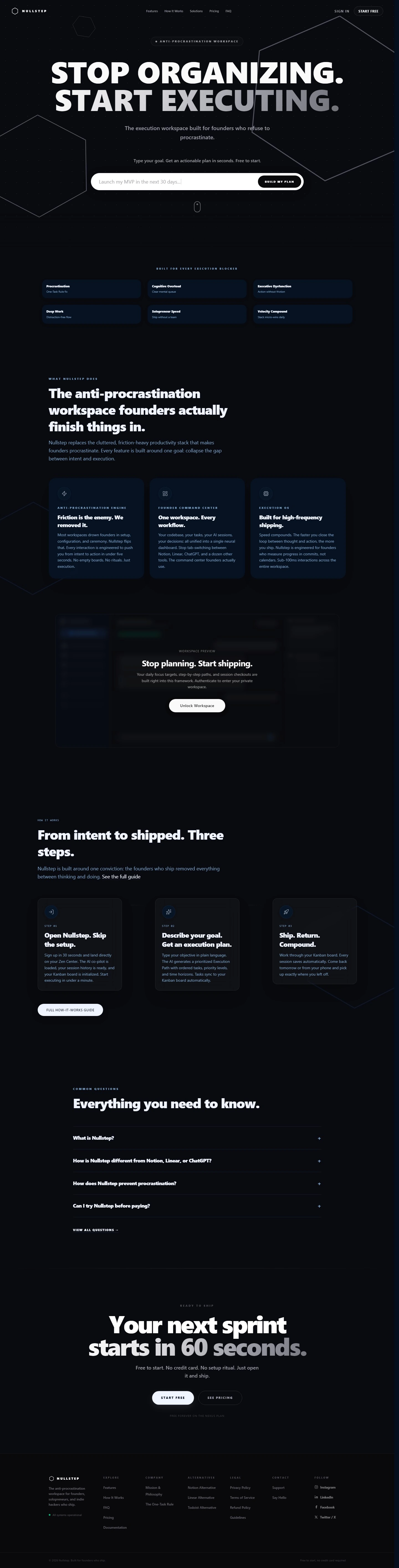
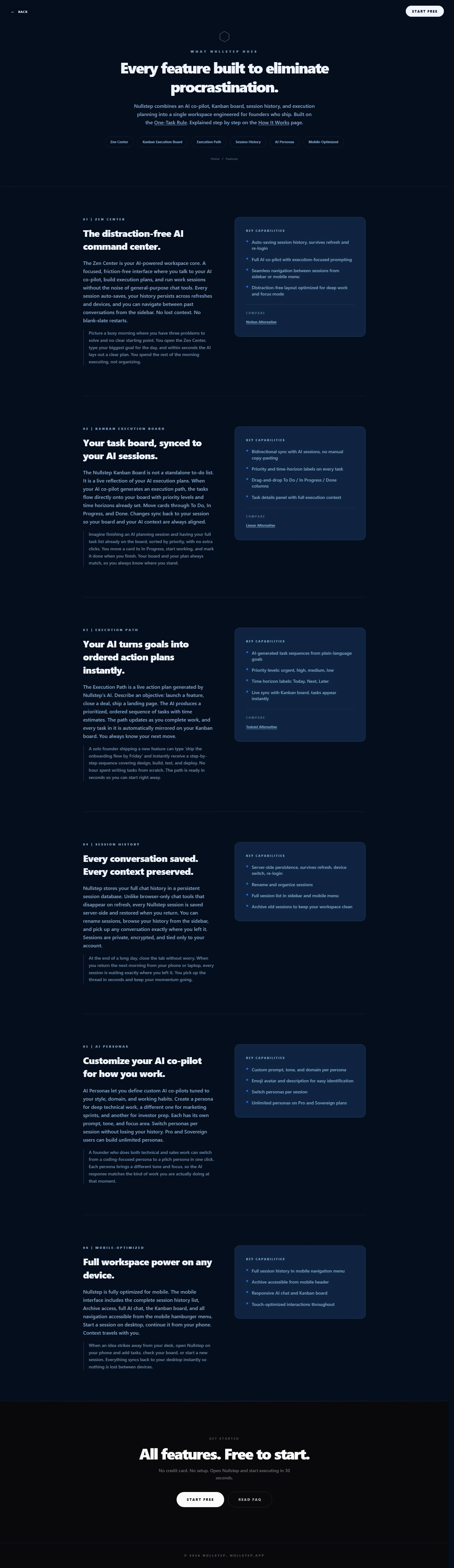
Top bar: MENU on the left, white LAUNCH APP pill on the right. Center hexagon mark, MADE BY NULLSTEP TEAM eyebrow, then the hero headline. Below it, anchor links jump to each module: AI Chat, Task Management, Goal Setting, Conversations, AI Co-pilot, Cross-Platform.
01 AI Chat: The distraction-free AI command center. Right panel: instant chat access, plan your day with AI, get answers, focus on what matters
02 Task Management: Task board synced to AI sessions. Bullets cover sync with chat, easy management, staying on goals, shipping faster
03 Goal Setting: AI turns goals into ordered action plans. Panels promise step-by-step guidance, progress tracking, faster achievement
04 Conversations: Every chat saved, every context preserved. Highlights: save all conversations, never lose context, easy past access
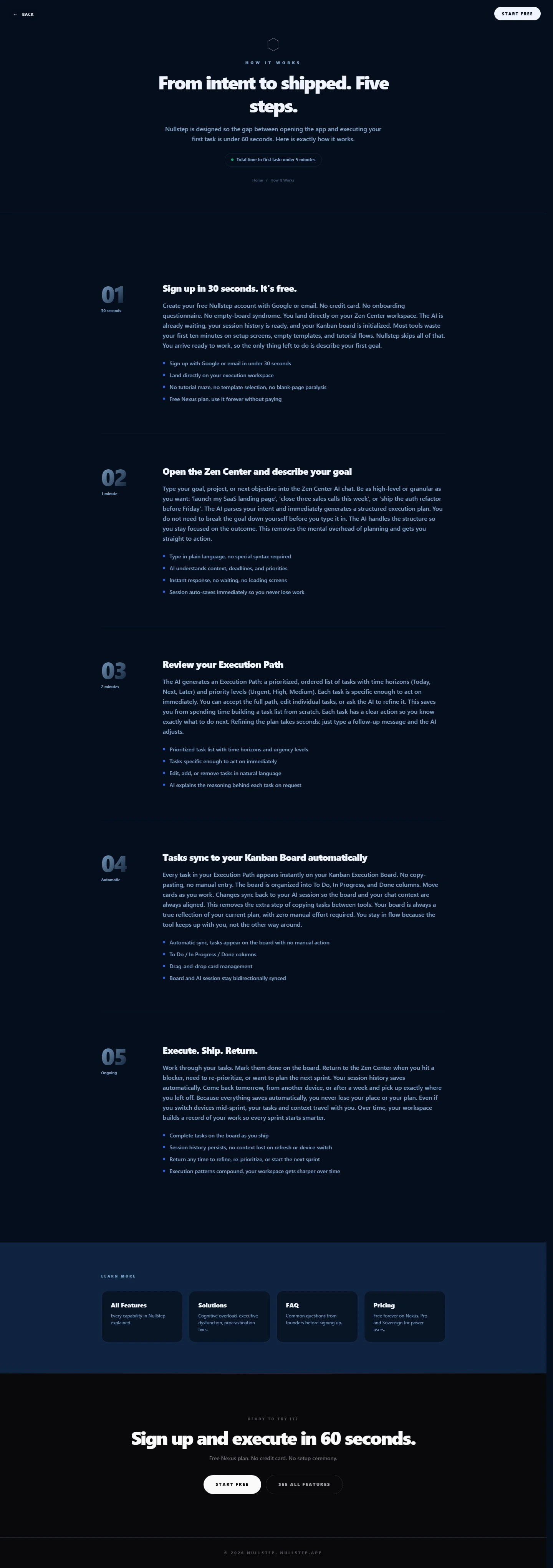
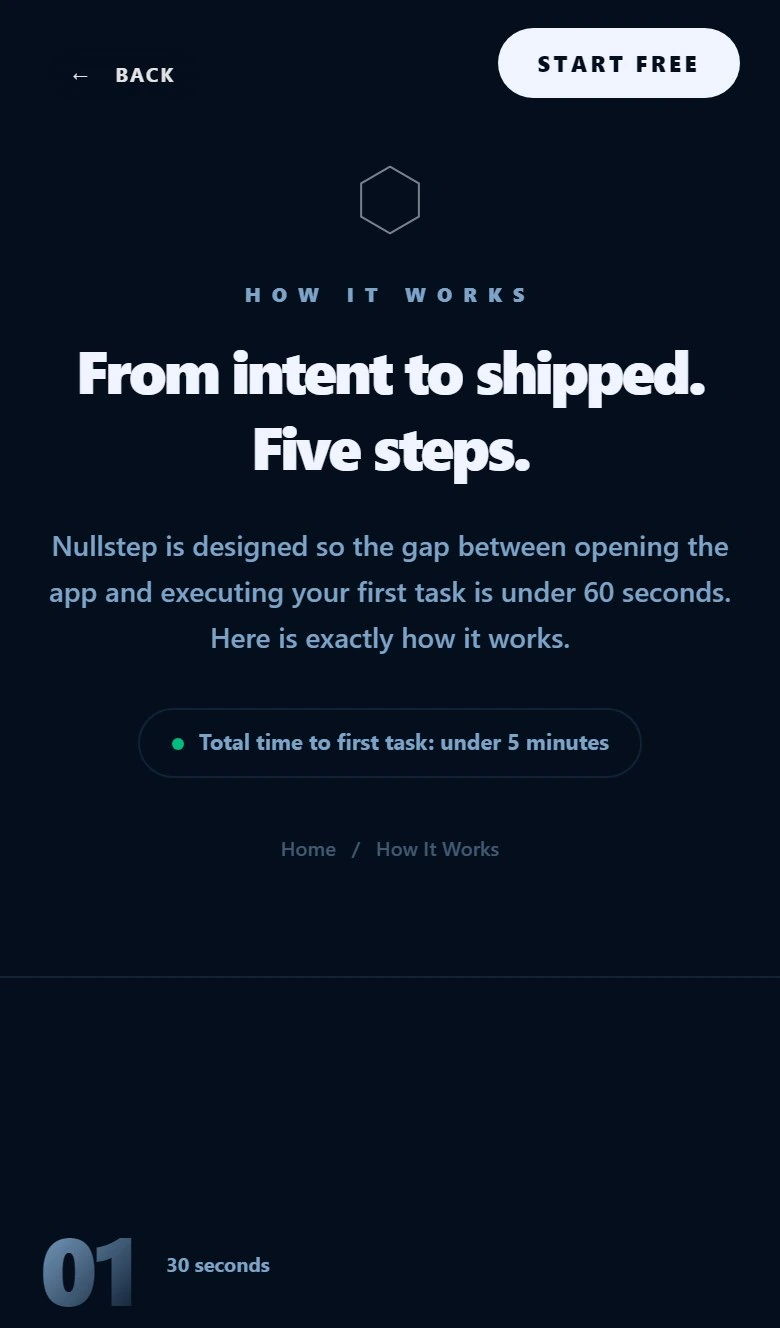
Header: LOG IN on the left, white START FREE pill on the right. Hero explains the gap between opening the app and recording a first task in under 60 seconds. Each step uses a large faded blue numeral (01 to 05) on the left with heading, paragraph, and bullet list on the right.
Step 01: Sign up in 30 seconds via Google or email. No credit card, no long questionnaire, no tutorial. Land in the workspace with no blank page paralysis
Step 02: Open Zen Center and describe your goal in plain language. AI reads context and constraints, then returns an execution plan instantly
Step 03: Review your Execution Path. Prioritized list with Today, Next, Later horizons. Edit tasks or ask the AI why something ranked where it did
Step 04: Tasks sync to Kanban automatically. To-Do, In Progress, Done columns with drag-and-drop. Power features stay hidden until needed
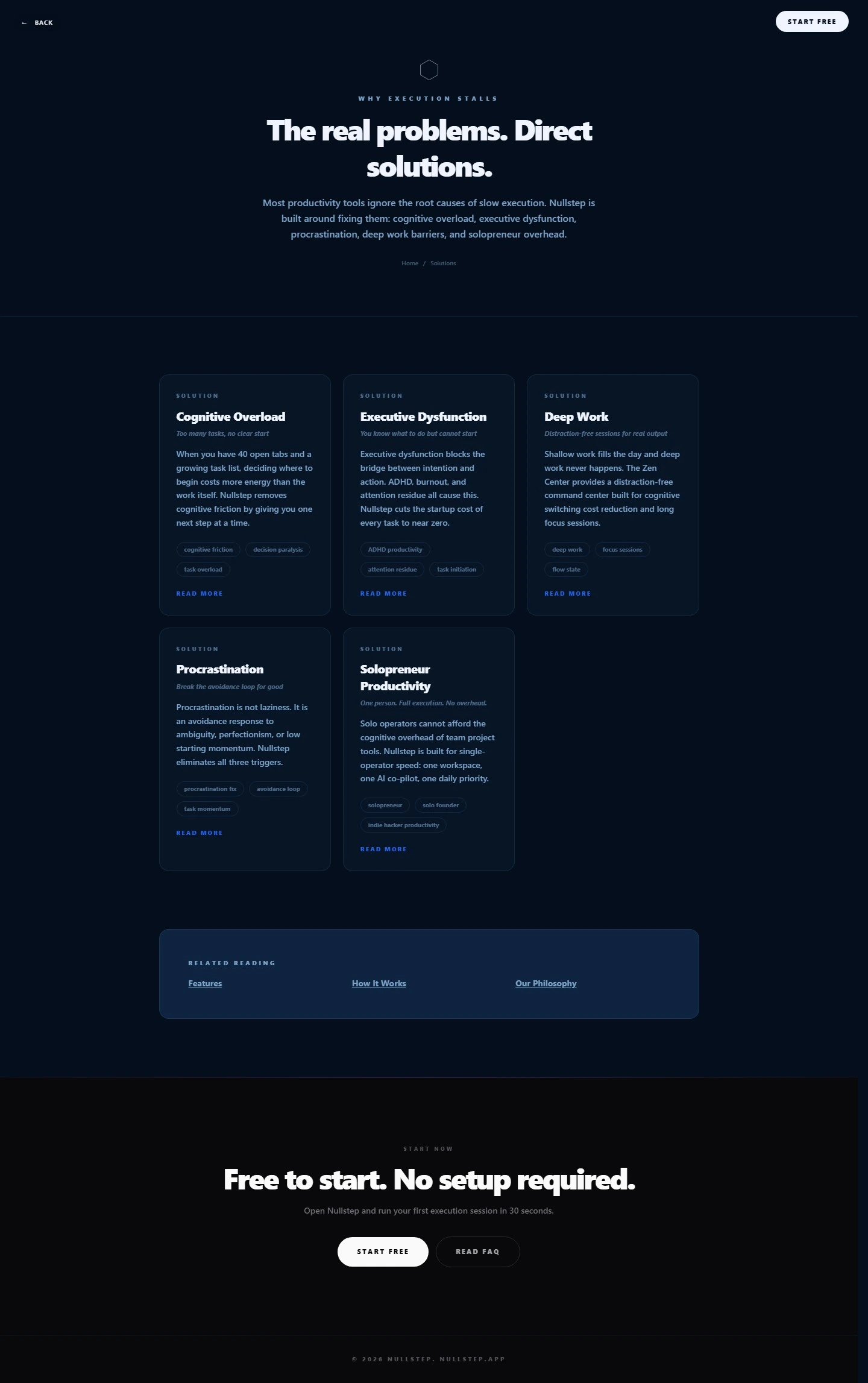
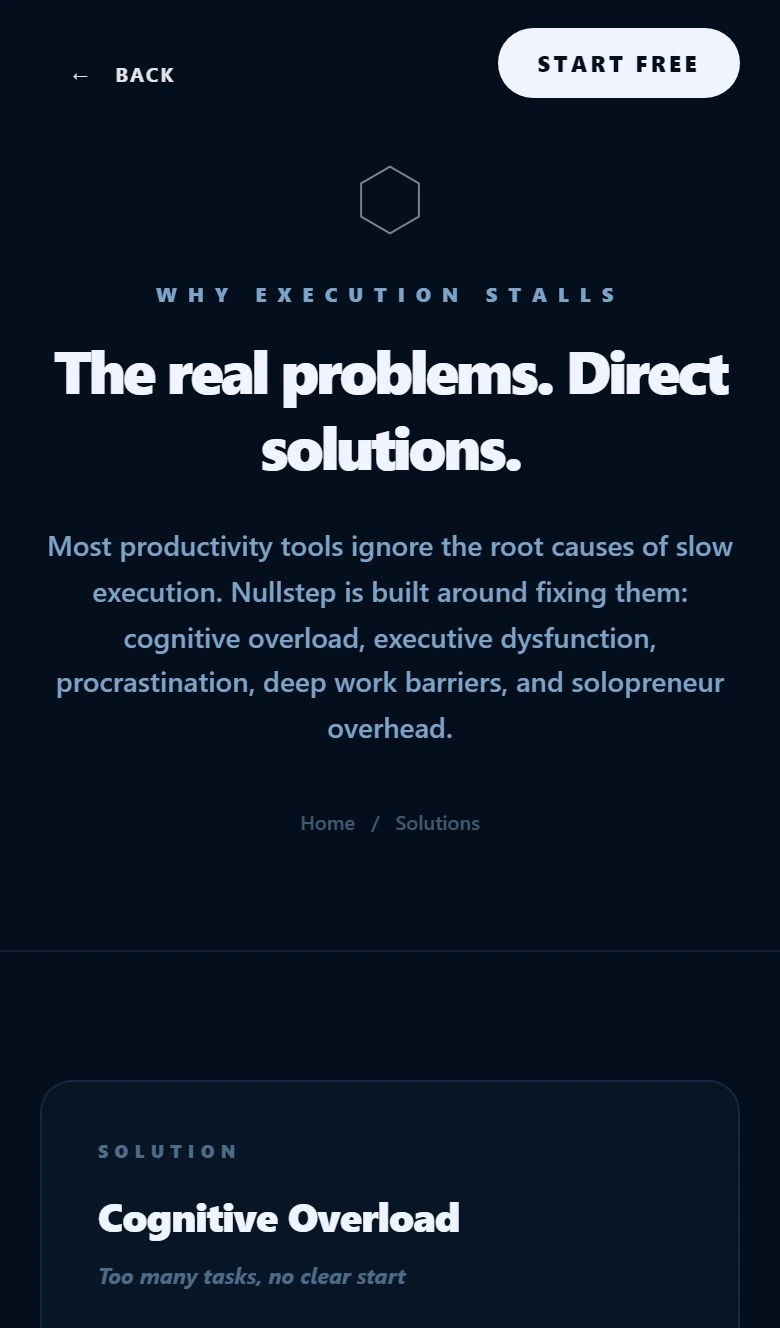
BACK link top left, START FREE pill top right. Center hexagon, WHY EXECUTION STALLS eyebrow, then the hero. Subhead names five root causes: cognitive overload, executive dysfunction, procrastination, deep work barriers, and solopreneur overhead. Breadcrumb reads Home / Solutions.
Cognitive Overload: Too many tasks, no clear start. The Nullstep project removes cognitive friction by giving one next step at a time. Tags: cognitive friction, decision paralysis, task overload
Executive Dysfunction: You know what to do but cannot start. Cuts the startup cost of every task to near zero. Tags: ADHD productivity, attention residue, task initiation
Deep Work: Distraction-free sessions for real output. Zen Center reduces cognitive switching cost for long focus sessions. Tags: deep work, focus sessions, flow state
Procrastination: Break the avoidance loop. Targets ambiguity, perfectionism, and low starting momentum. Tags: procrastination fix, avoidance loop, task momentum
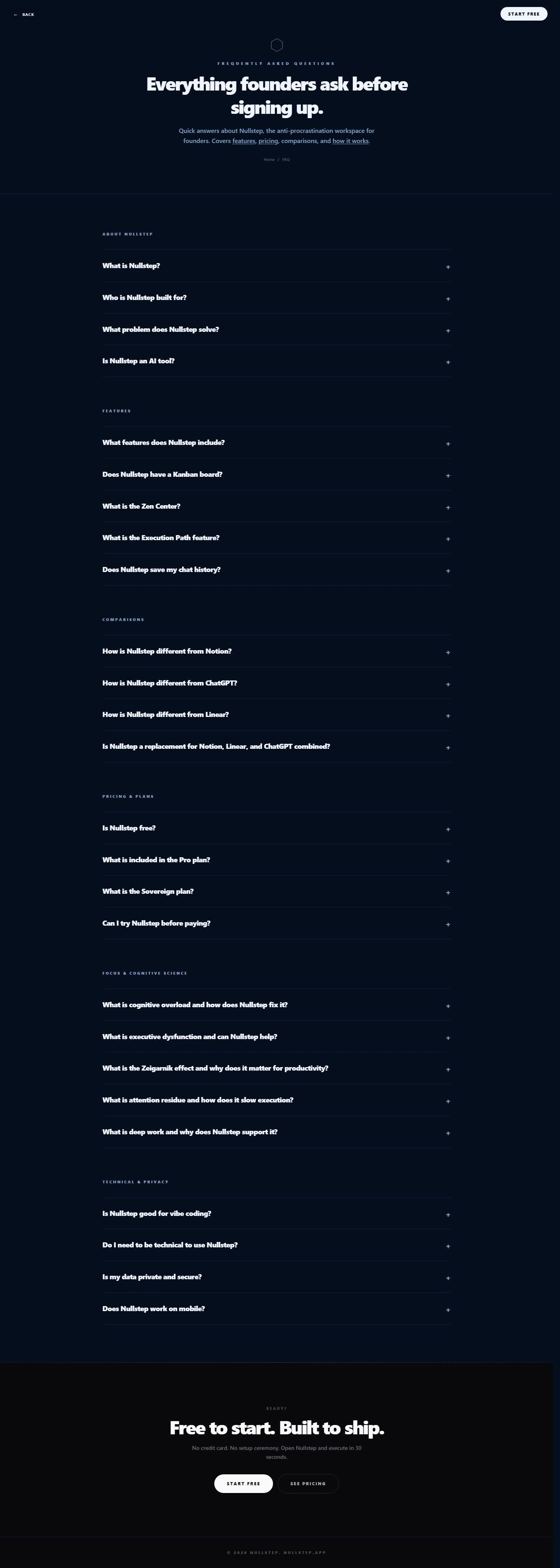
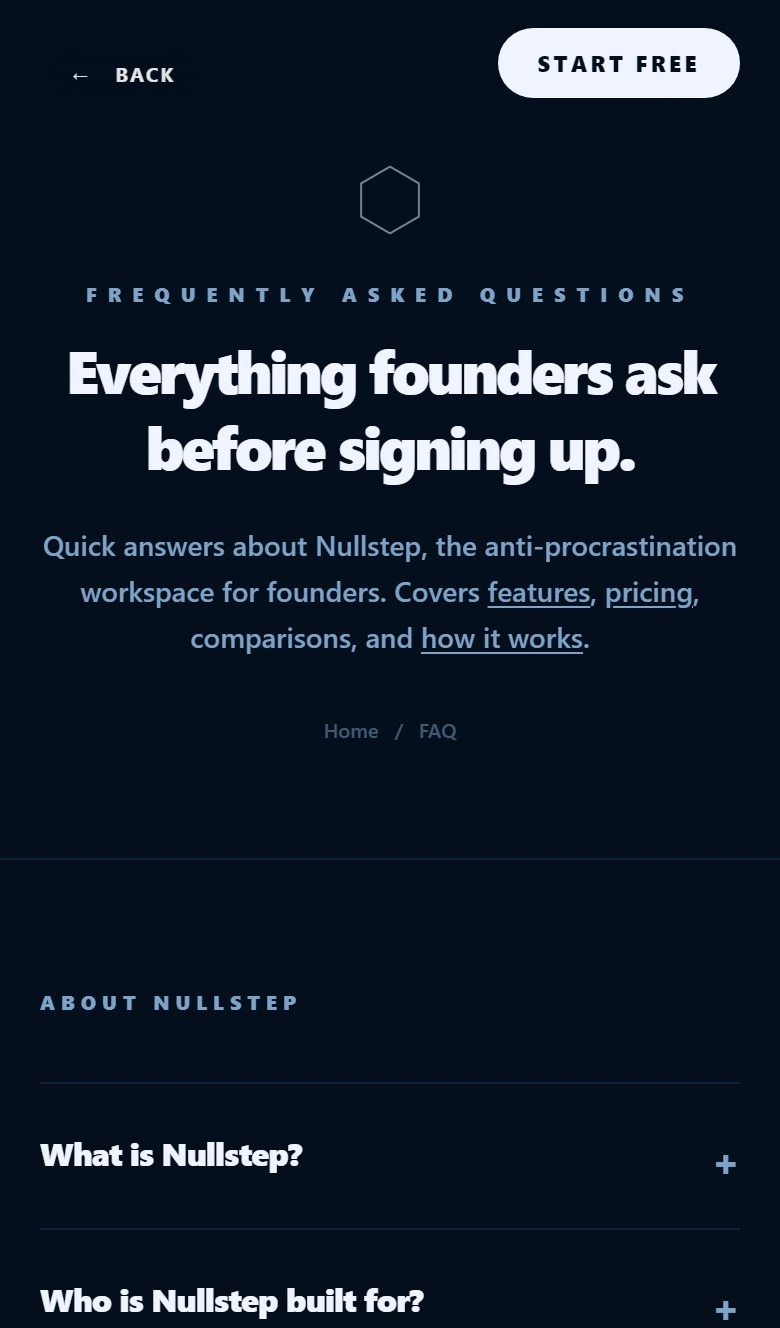
Minimal header with logo left and START FREE right. Hexagon icon, FREQUENTLY ASKED QUESTIONS eyebrow, hero headline, and a short trust paragraph. Breadcrumb: Home > FAQ.
About the Nullstep project: what it is, who it is for, what problem it solves, whether it is an AI tool
Features: full feature list, Kanban board, Zen Center, Execution Path, chat history retention
Comparison: vs Notion, vs ChatGPT, vs Linear, and the all-in-one replacement question
Pricing and Plans: free tier, Pro inclusions, Sovereign tier, try-before-pay
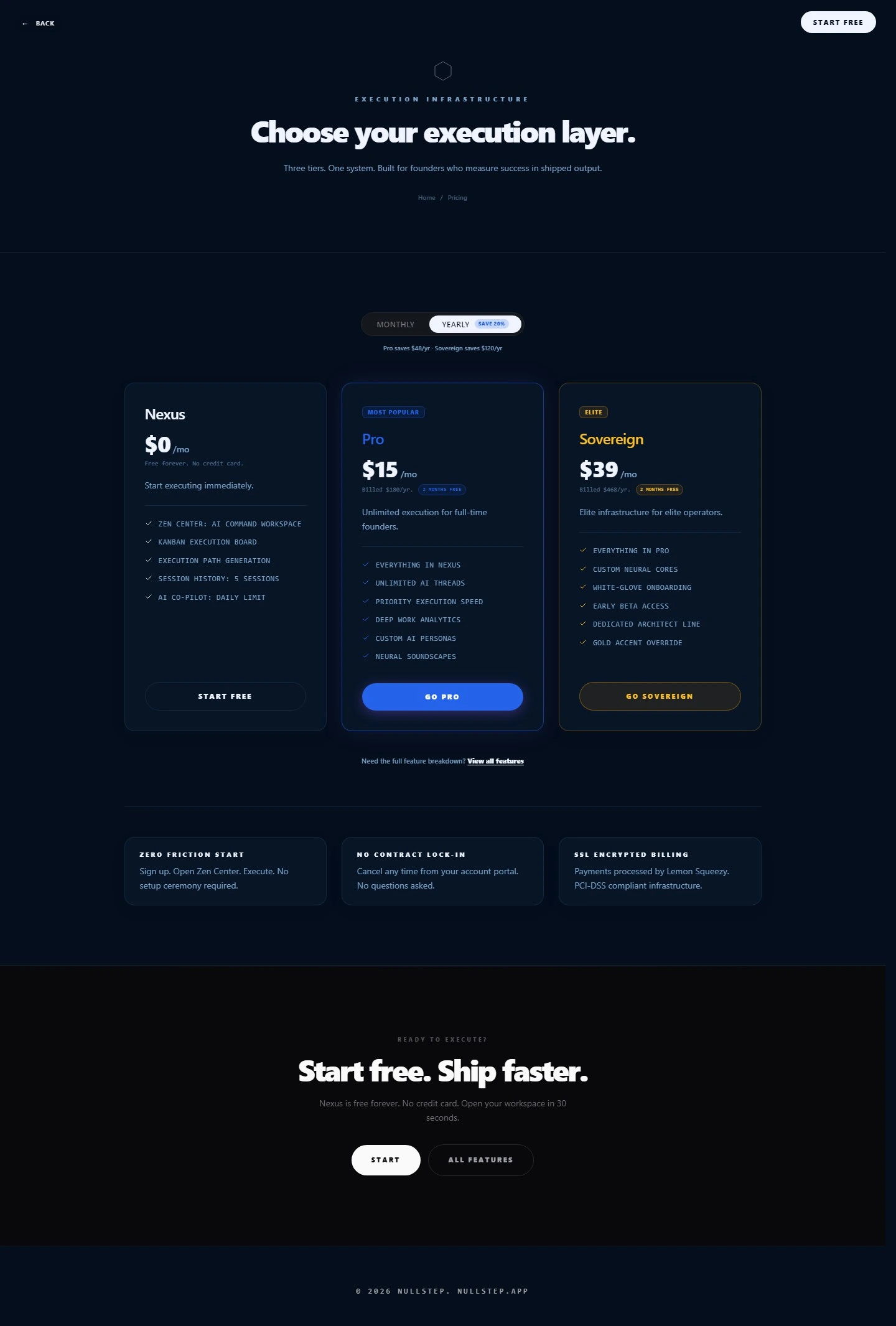
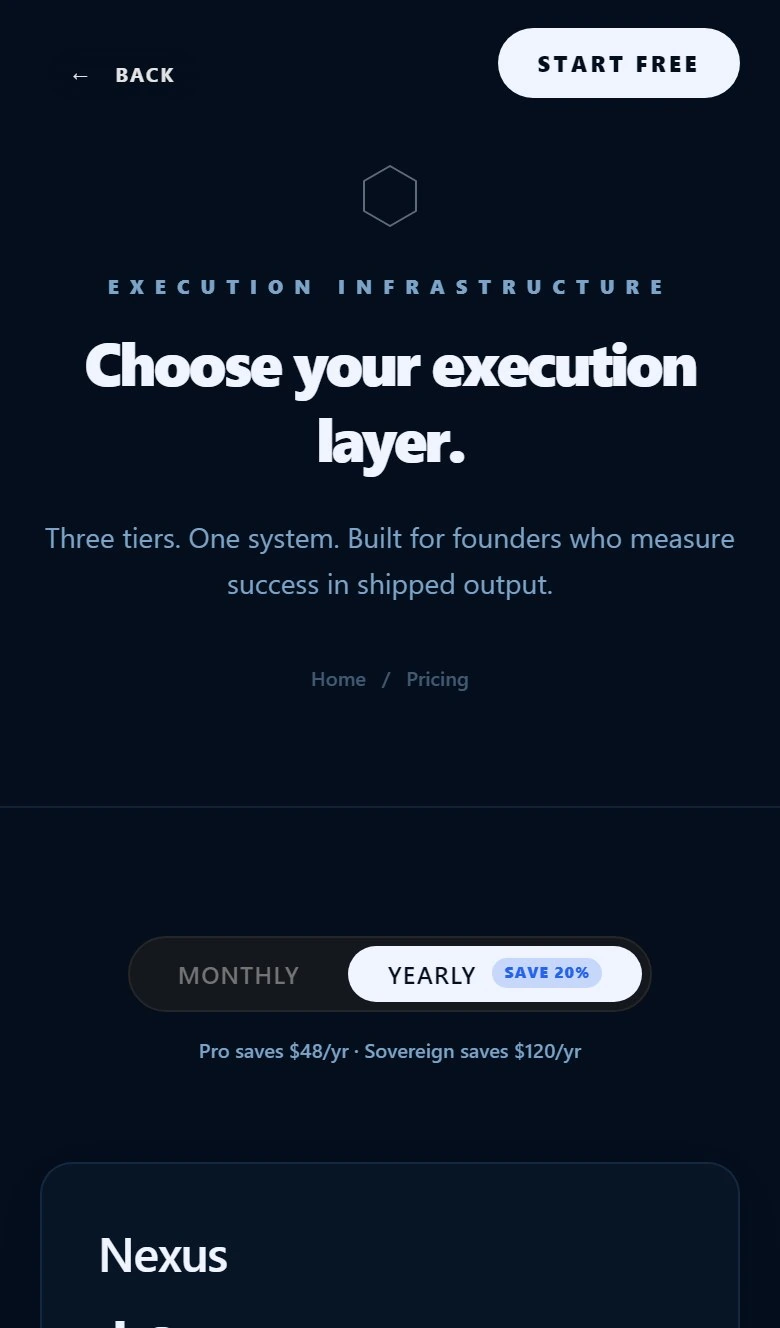
BACK left, START FREE right. EXECUTION INFRASTRUCTURE eyebrow above the hero. Three tier cards side by side with a centered MONTHLY / YEARLY toggle. Yearly selected shows SAVE 20% badge and savings copy: Pro saves $48/yr, Sovereign saves $120/yr.
Nexus ($0/mo): Free forever, no credit card. Zen Center, Kanban board, Execution Path, 5 session history, daily AI co-pilot limit. Outlined Start Free CTA
Pro ($15/mo yearly, $180/yr billed): Unlimited AI threads, priority execution speed, deep work analytics, custom AI personas, neural soundscapes. Solid blue Go Pro CTA
Sovereign ($39/mo yearly, $468/yr billed): Custom neural cores, white glove onboarding, early beta access, dedicated architect line, gold accent override. Gold-bordered Go Sovereign CTA
Uppercase feature checklist labels for fast scanning across all three tiers
+2 more details in full capture
Responsive · mobile
How the site looks and works on mobile
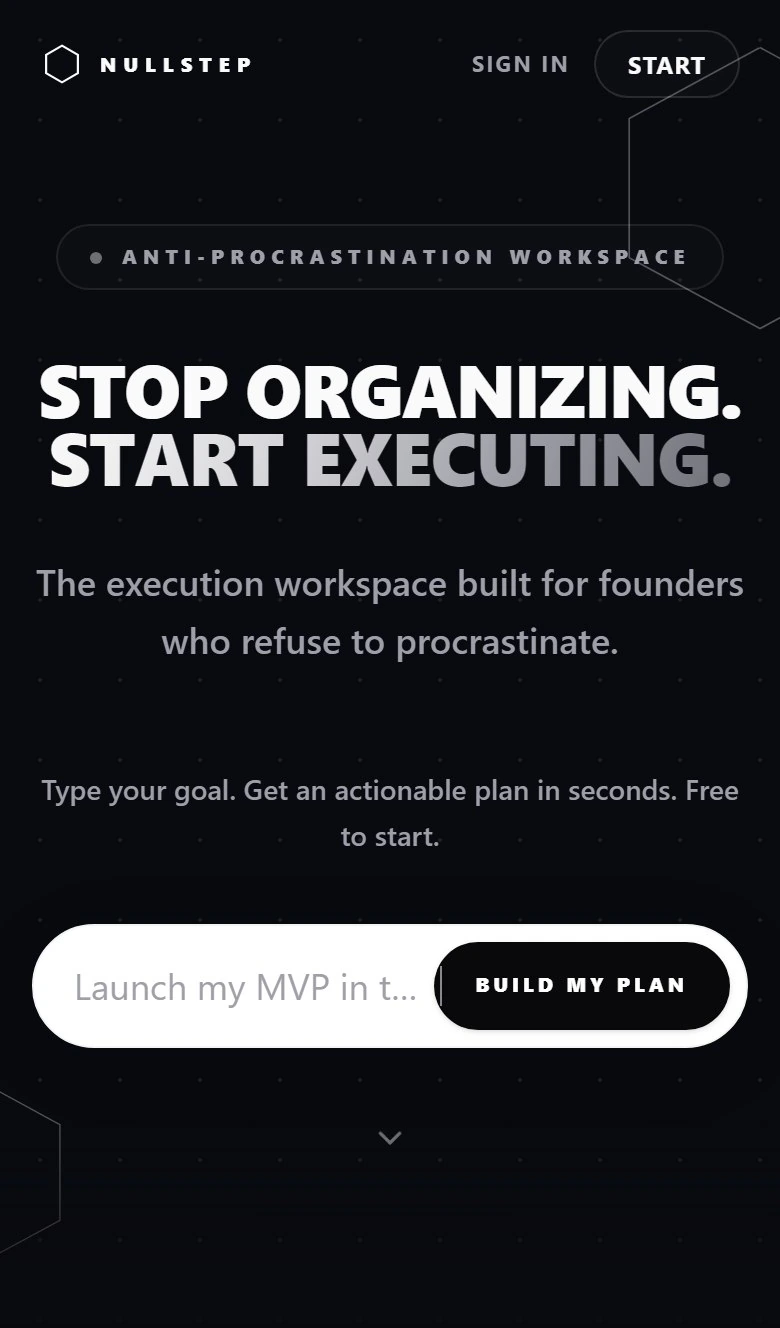
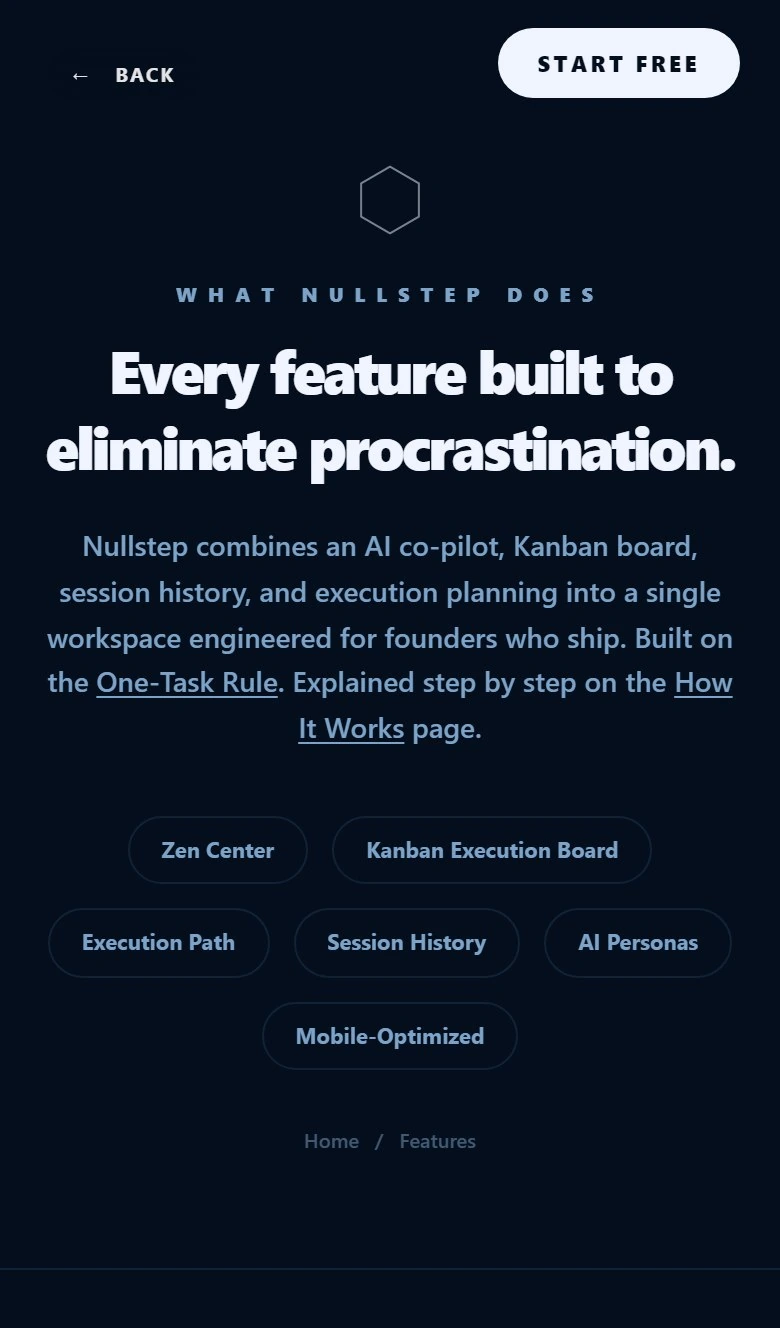
Nullstep is mobile-first and fully responsive. The site appears cleanly on phones and stays functional across the full marketing funnel. No pinch-zoom, no broken grids, no CTAs falling off screen.
I built with responsive layouts, touch-sized controls, and single-column stacks on narrow viewports so navigation, forms, accordions, and pricing tiers work the same way on mobile as on desktop. The site does not just look good on a phone, it performs.
How we made it mobile-friendly
Responsive breakpoints reflow content from 390px phones to desktop without losing hierarchy.
Sticky header and thumb-sized START FREE / BUILD MY PLAN buttons keep conversion paths one tap away.
Typography, spacing, and cards scale so long pages (FAQ, Features, Pricing) stay readable and scroll smoothly.
Every page was checked on real mobile viewports before launch. Links, toggles, and CTAs all work live.
Monthly/yearly toggle, tier cards, and trust copy stack in one column so comparison and checkout intent stay clear.
Core capabilities
The workspace solo founders actually ship from
Nullstep is a live application I built on my own to practice product engineering with digital strategy, SEO, copy, GEO, social content, and Meta ads.
01 · Home base
Command dashboard
Today's priority, session history, and progress at a glance. The first screen after signup already points forward instead of a empty workspace.
02 · Zen chat
Zen Center
Distraction-free AI chat. Plan your day, describe a goal, get an execution plan, all inside one calm command center instead of five browser tabs.
03 · Synced board
Kanban board
Work born in chat lands on the board automatically. To-Do, In Progress, Done with drag-and-drop. Power features stay hidden until you need them.
04 · Priorities
Execution Path
Prioritized tasks grouped by Today, Next, and Later. The structured output between Zen Chat and Kanban so founders always see one clear next step.
05 · Personalization
AI Co-pilot
Customize tone, model, and preferences so the AI matches how you actually work as a solo founder, not a generic assistant voice.
06 · Memory
Session history
Every chat saved, every context preserved. Pick up where you left off without re-explaining your project to the AI from scratch.
Why it works
Less friction, one workspace, a rhythm built for shipping
Nullstep replaces the founder stack of Notion plus ChatGPT plus a task app. I translated that product loop into marketing copy, UX surfaces, and funnel pages so the value reads clearly before signup.
One loop, three surfaces.
Dashboard for orientation, Zen Chat for thinking, Kanban for doing. Founders stop juggling Notion, ChatGPT, and Linear for a single sprint.
Chat creates the board.
Tasks are not typed twice. Describe work in Zen Center, review the Execution Path, and the Kanban columns fill themselves. Edit or drag anytime.
Built for weekly shipping.
The product assumes you return often. Session history, compounding context, and a dashboard that surfaces the next move beat one-time planning docs.
Workflow
From intent to shipped. Five steps.
01
Sign up in 30 seconds. It is free.
Google or email signup. No credit card, no long questionnaire. Land directly in the workspace with no blank page paralysis.
02
Open Zen Center and describe your goal
Type what you want done in plain language. The AI understands context and returns an execution plan instantly.
03
Review your Execution Path
Prioritized tasks grouped by Today, Next, and Later. Edit manually or ask the AI why a task ranked where it did.
04
Tasks sync to your Kanban board
To-Do, In Progress, and Done columns populate automatically. Drag, drop, and ship without re-entering work.
05
Execute. Ship. Return.
Mark tasks done, sync across devices, and come back for the next sprint. The workspace gets smarter over time.
Solutions
The real problems. Direct solutions.
Solution
Cognitive Overload
Too many tasks, no clear start
When you have 40 open tabs and a growing task list, deciding where to begin costs more energy than the work itself. The Nullstep project removes cognitive friction by giving you one next step at a time.
cognitive frictiondecision paralysistask overload
Solution
Executive Dysfunction
You know what to do but cannot start
Executive dysfunction blocks the bridge between intention and action. ADHD, burnout, and attention residue all cause this. The Nullstep project cuts the startup cost of every task to near zero.
ADHD productivityattention residuetask initiation
Solution
Deep Work
Distraction-free sessions for real output
Shallow work fills the day and deep work never happens. The Zen Center provides a distraction-free command center built for cognitive switching cost reduction and long focus sessions.
deep workfocus sessionsflow state
Solution
Procrastination
Break the avoidance loop for good
Procrastination is not laziness. It is an avoidance response to ambiguity, perfectionism, or low starting momentum. The Nullstep project eliminates all three triggers.
procrastination fixavoidance looptask momentum
Solution
Solopreneur Productivity
One person. Full execution. No overhead.
Solo operators cannot afford the cognitive overhead of team project tools. The Nullstep project is built for single-operator speed: one workspace, one AI co-pilot, one daily priority.
solopreneursolo founderindie hacker productivity
FAQ structure
Everything founders ask before signing up
About the Nullstep project
What is the Nullstep project?
Who is the Nullstep project built for?
What problem does the Nullstep project solve?
Is the Nullstep project an AI tool?
Features
What features does the Nullstep project include?
Does the Nullstep project have a Kanban board?
What is the Zen Center?
What is the Execution Path feature?
Comparison
How is the Nullstep project different from Notion?
How is the Nullstep project different from ChatGPT?
How is the Nullstep project different from Linear?
Is the Nullstep project a replacement for Notion, Linear, and ChatGPT combined?
Pricing and Plans
Is the Nullstep project free?
What is included in the Pro plan?
What is the Sovereign plan?
Can I try the Nullstep project before paying?
Focus and Cognitive Science
What is cognitive overload and how does the Nullstep project fix it?
What is executive dysfunction and can the Nullstep project help?
What is the Zeigarnik effect?
What is attention residue and how does it slow execution?
What is deep work and why does the Nullstep project support it?
Technical and Privacy
Is the Nullstep project good for solo coding?
Do I need to be technical to use the Nullstep project?
Is my data private and secure?
Does the Nullstep project work on mobile?
Pricing
Choose your execution layer
Nexus
$0 /mo
Free forever. Start executing immediately.
+Zen Center AI workspace
+Kanban execution board
+Execution Path generation
+5 session history
+Daily AI co-pilot limit
Most popular
Pro
$15 /mo
Unlimited execution for full-time founders. Most popular tier.
+Everything in Nexus
+Unlimited AI threads
+Priority execution speed
+Deep work analytics
+Custom AI personas
+Neural soundscapes
Sovereign
$39 /mo
Elite infrastructure for elite operators. Billed $468/yr with 2 months free.
+Everything in Pro
+Custom neural cores
+White glove onboarding
+Early beta access
+Dedicated architect line
+Gold accent override
Page architecture
From hook to signup in one calm scroll
Features: prove the product
Six repeating modules with anchor nav and paired highlight cards. Each section answers what can I do here? without sending the founder to another page.
How It Works: show the journey
Five numbered steps with faded numerals make the path from signup to first shipped task visible in one scan. Learn More tiles bridge to the rest of the site.
Solutions: name the pain
Five psychology-first cards (overload, dysfunction, deep work, procrastination, solopreneur speed) with tags and Read More links for depth without clutter.
FAQ: remove objections
Six accordion categories from product basics through cognitive science to privacy. The science section is the trust differentiator vs generic AI tools.
Pricing: close the loop
Three tiers, yearly toggle with save badges, Pro highlighted as most popular, Sovereign gold-tier positioning, and trust copy on billing and cancellation.
Deliverables
Live personal project: solo-engineered execution workspace and marketing site
Solo-engineered live execution workspace and marketing site
On-page SEO, copywriting, and page titles and internal links
 Open full-size report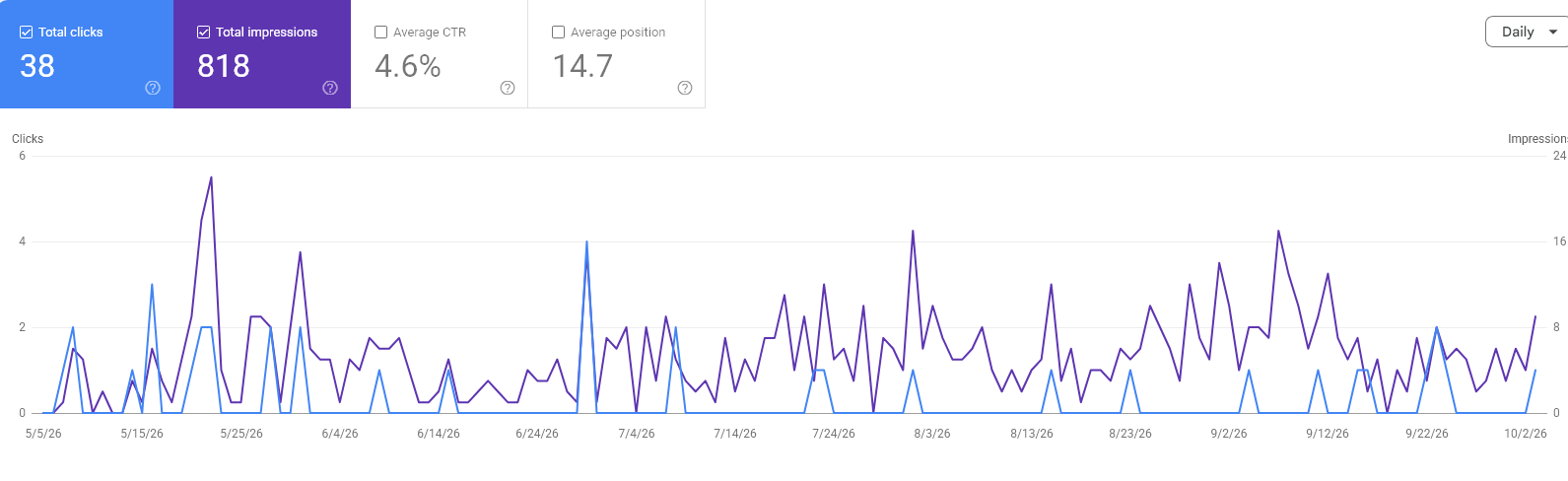
Social & video
Nullstep: from product to Instagram
From the first line to the final edit. A selection of my creative work for Nullstep.
Your ideas. Finally real: introducing the Nullstep workspace.
Building in silence: the unseen work behind a product.
Pause. Breathe. Respond: a reel about managing stress and friction.
Enjoy the climb: small steps, iteration, and the messy middle.
Stop waiting to feel ready. Start building.
Every builder starts here: confidence comes from doing the work.
My contribution: product messaging, scripts, visual design, video editing, and publication.